
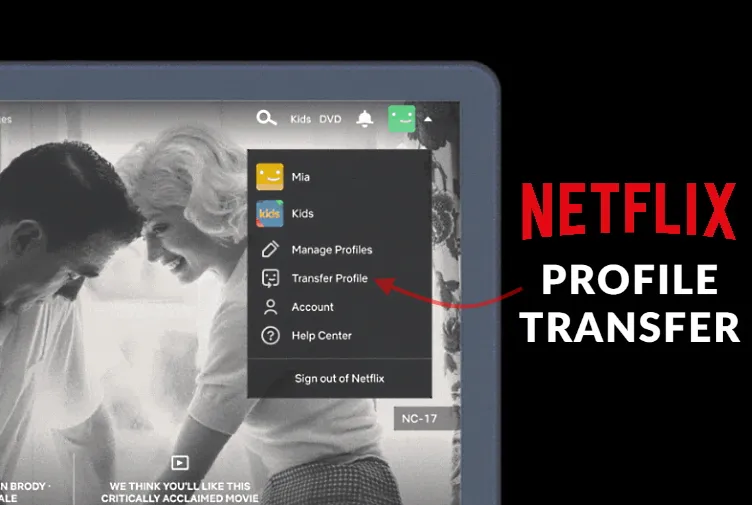
Netflix has become an integral part of our daily lives, offering a vast library of movies and TV shows. As our viewing habits evolve, so might our need to transfer our Netflix profile to a new account or device. Whether you’re moving to a new account, sharing your account with a friend, or simply switching devices, understanding the process of transferring your Netflix profile is essential.
Understanding Netflix Profiles
Before diving into the transfer process, it’s crucial to grasp the concept of Netflix profiles. A Netflix profile is a personalized viewing experience that allows you to:
Save Your Favorites: Keep track of your favourite shows and movies.
Customize Recommendations: Receive tailored suggestions based on your viewing history.
Create Watch Lists: Curate lists of movies and shows you want to watch later.
Parental Controls: Set parental controls to restrict content for specific profiles.
Can You Directly Transfer a Netflix Profile?
Unfortunately, Netflix doesn’t offer a direct, one-click method to transfer a profile from one account to another. This is because profiles are tied to specific accounts, and Netflix’s system isn’t designed for seamless profile transfers.
Workarounds for Profile Transfer

While a direct transfer isn’t possible, there are a few workarounds you can consider:
Account Sharing:
Pros: Simple and effective for sharing your account with trusted individuals.
Cons: Potential account sharing restrictions and potential security risks.
How to:
Share your Netflix account credentials with the person you want to share with.
They can create a new profile on your account and personalize it to their preferences.
Manual Profile Recreation:
Pros: High level of control over the transferred profile.
Cons: Time-consuming and requires effort to recreate preferences.
How to:
Create a new profile on the target account.
Manually add favourite shows, movies, and watch lists.
Adjust parental controls and other settings to match the original profile.
Important Considerations for Profile Transfer
Account Sharing Restrictions: Netflix has implemented measures to curb account sharing. Be aware of these restrictions to avoid account suspension or other penalties.
Password Sharing: If you’re sharing your account, ensure you use a strong, unique password to protect your account information.
Privacy Settings: Review and adjust privacy settings on both accounts to control the visibility of your viewing history and recommendations.
Device Limitations: Be mindful of device limitations imposed by Netflix. Some plans may restrict the number of devices that can stream simultaneously.
Why Transfer Your Netflix Profile?
Before we dive into the specifics, let’s explore the reasons why you might want to transfer your Netflix profile:
Account Sharing: If you’re sharing your Netflix account with friends or family, transferring profiles can help organize viewing history, personalized recommendations, and saved content.
Device Switching: When you switch devices (e.g., from a TV to a tablet), transferring your profile ensures a seamless viewing experience.
Account Transfer: If you’re transferring your Netflix account to a new owner, transferring profiles can help maintain personalized settings and viewing history.
Understanding Netflix Profiles
A Netflix profile is a unique user account within a shared Netflix subscription. It stores personalized information such as:
Viewing History: A record of the shows and movies you’ve watched.
Watchlist: A list of titles you want to watch later.
My List: A collection of your favourite shows and movies.
Parental Controls: Customized settings for different age groups.
Language Preferences: Your preferred language for subtitles and audio.
How to Transfer Your Netflix Profile
Unfortunately, Netflix doesn’t offer a direct, one-click method to transfer profiles. However, there are a few workarounds you can try:
Method 1: Creating a New Account and Transferring Information Manually
Create a New Account: Sign up for a new Netflix account on the same device.
Transfer Viewing History: While Netflix doesn’t provide a direct way to transfer viewing history, you can manually add titles to your new profile’s watchlist.
Transfer My List: Create a new My List on your new profile and manually add your favourite shows and movies.
Transfer Parental Controls: Set up parental controls on your new profile and adjust them as needed.
Transfer Language Preferences: Set your preferred language preferences on your new profile.
Method 2: Using a Third-Party Service (With Caution)
Some third-party services claim to help transfer Netflix profiles. However, it’s important to exercise caution when using such services, as they may not be officially supported by Netflix and could potentially violate terms of service.
Important Considerations
Account Sharing Rules: Be aware of Netflix’s account-sharing policies and restrictions.
Profile Limits: Netflix typically allows a limited number of profiles per account.
Data Privacy: Be mindful of your data when transferring profiles.
Third-Party Services: Use third-party services at your own risk.
FAQs
Q: Can I transfer my Netflix profile to a different email address?
A: No, you cannot directly transfer your profile to a different email address. However, you can create a new profile on a new account with the same email address.
Q: Can I transfer my Netflix profile to a different device?
A: Yes, you can access your Netflix profile on different devices by signing in with your account credentials.
Q: Can I transfer my Netflix profile to a friend or family member?
A: While you can share your Netflix account with friends and family, you cannot directly transfer your profile to them. You can create a new profile for them on your shared account.
Q: Will my viewing history and recommendations transfer to my new profile?
A: Not directly. You can manually add titles to your new profile’s watchlist and My List to recreate your viewing history and recommendations.
Q: Are there any risks associated with transferring my Netflix profile?
A: Using third-party services to transfer profiles may carry risks, such as potential account security issues. It’s generally safer to transfer information manually.
In Summary
While Netflix doesn’t offer a straightforward way to transfer profiles, understanding the methods available can help you maintain your personalized viewing experience. By following the steps outlined in this guide, you can seamlessly transfer your Netflix profile and continue enjoying your favourite shows and movies.
To read more, Click here